Properties & tenants
A shop, a flat, a plot — whether you collect rent on it or pay rent for it, with the tenancy, the deposit and every month's payment in one place.
A property in Businessly is just a name — Property name, with hints like Shop #4, House 12, Internet…. Everything else hangs off it.
Each one is either Rent in (you receive) — a tenant pays you — or Rent out (you pay) — you pay a landlord.
Adding one
Add the property first, with nothing but a name. It sits as vacant until you let it.
Starting a tenancy
Tap Start rental and fill in:
- The tenant — anyone from your customers, or a new name.
- The monthly rent.
- The month it starts from.
- A Deposit, if you took one.
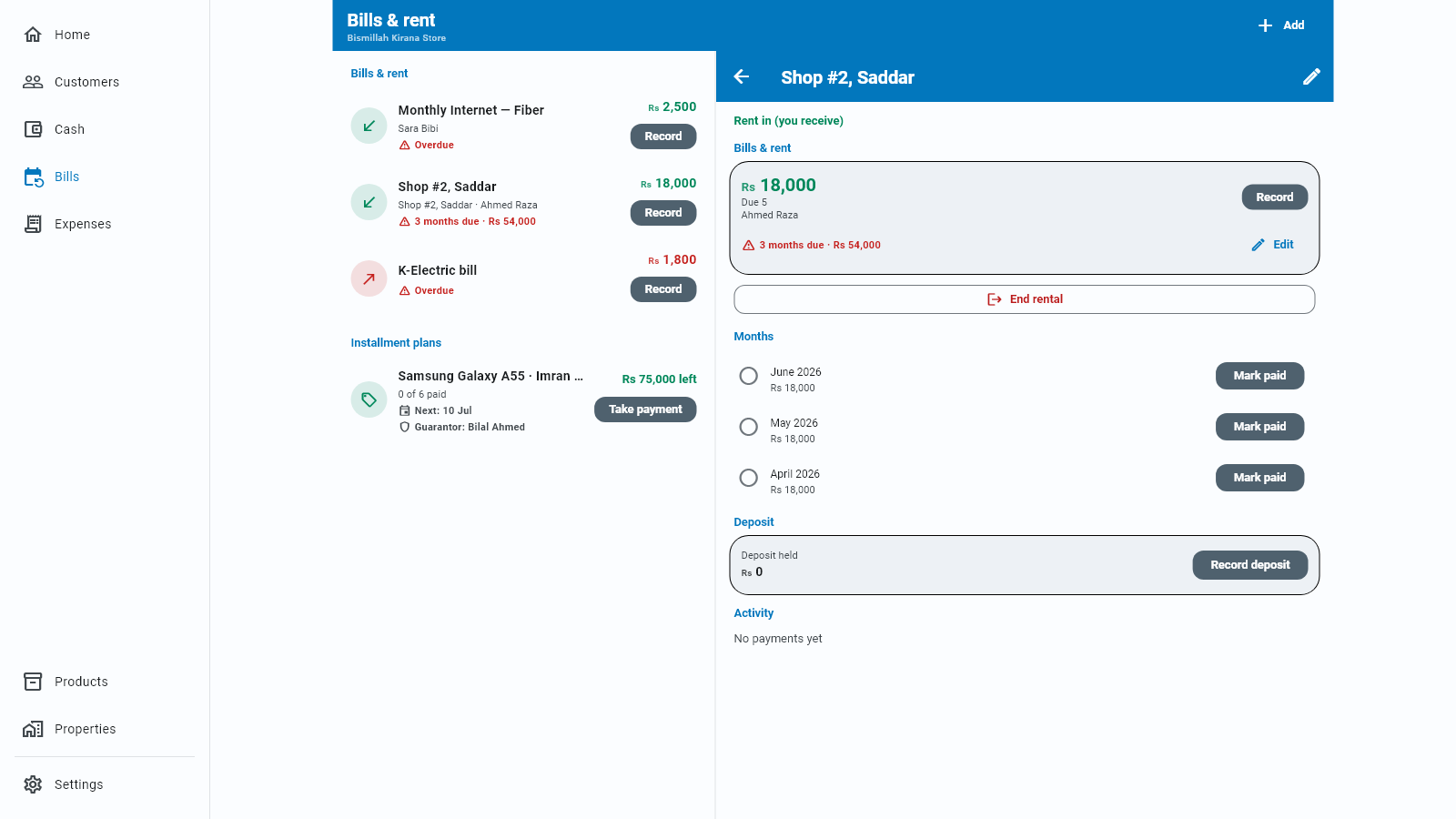
The property now shows as rented, and a month-by-month schedule appears.
Each month
The property's page lists the months. When rent comes in, tap Mark paid on that month. The date picker names the month, so you see what will be recorded before you tap OK. The toast then says the month and amount recorded and offers Undo; the paid row keeps its own Undo too, which asks before reversing.
A real cash entry is created only when you mark it paid — same rule as Bills & rent. Until then the month is just expected.
Several months at once — arrears or advance — are handled in Paying months in a lump sum.
Seeing who is behind
Unpaid months show in three places, all from the same count: the property's own page (N months due with the amount), the tenant's statement as a red N months behind chip, and Home as Rent due (kiraya) — the total owed across every tenant, which opens Bills & rent. It only appears while something is owed.
The deposit
A deposit is tracked separately from the rent, because it is not income — you are holding someone else's money. Deposit held shows what you have. Recording or refunding one — including the refund made when you end a rental — shows a toast with the amount and an Undo, in case the figure was wrong. Ending a rental with nothing to refund simply confirms Rental ended.
When the tenant leaves, refund it and the record closes out properly.
Reminders
Send the tenant a WhatsApp reminder from the property's page. You can also mute reminders for a month when you know rent is coming late and do not want chasing.
The phone notification reminding you that rent is due does not arrive on a PC. Everything else on this screen works normally.
Ending a tenancy
End rental returns the property to vacant, ready to let again. Payments already recorded stay in your books — ending a tenancy never rewrites history.
Cancelling a payment
A payment recorded by mistake is fixed from the property's page. Every row in its history ends in a ⋮ with Cancel entry. Businessly asks first (Cancel this entry?); confirm and the money leaves your cash book, and that month reopens so you can record it again. Keep entry changes nothing. A row that is already cancelled has no ⋮.
Removing a property
A property you no longer need — sold, or a bill that has stopped — can be hidden from the list. Tap the ⋮ at the end of its row and choose Remove; Businessly asks first (Remove this property?). Payments you already recorded stay in your books.
How this relates to Bills
A rental is a recurring item with a friendlier face. The money flows through the same cash book and the same statements, so your totals are always consistent. Properties just give you a view organised by place rather than by payment.